Recently I had to create a form to create/update users in our system. Some time ago we decided to save are users in 2 tables. The first table would contain all login information and the second his personal information. This is a simple example of the DB design:
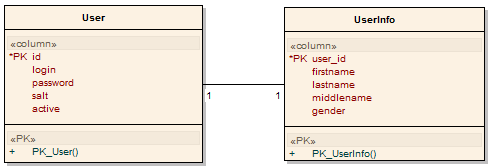
User db design
I would not recommend doing this for so little fields. But in our system we have a lot more fields, and it helps us to optimize our queries.
Wouldn’t it be better if we could merge the 2 forms? The answer is yes. And it’s pretty easy to do so in Symfony … too bad that it’s not documented on the Symfony website.
When you generate the forms with Symfony, you’ll get a UserForm and a UserInfoForm.
/**
* User form.
*
* @package form
*/
class UserForm extends BaseUserForm {
public function configure() {
}
}
/**
* UserInfo form.
*
* @package form
*/
class UserInfoForm extends BaseUserInfoForm {
public function configure() {
}
}
The idea is to display one form to insert/update those 2 tables. If you are familiar to creating forms with Symfony you know that you could achieve it by instantiating the 2 forms in an action and send them to the templates:
/**
* Action Class
*/
class userActions extends sfActions
{
public function executeCreate($request) {
$this->userForm = new UserForm();
$this->userInfoForm = new UserInfoForm();
$this->setTemplate('edit');
}
public function executeEdit($request) {
$this->userForm = new UserForm(UserPeer::retrieveByPK($request->getParameter('id')));
$this->userInfoForm = new UserInfoForm(UserInfoPeer::retrieveByPK($request->getParameter('id')));
}
public function executeUpdate($request) {
$this->userForm = new UserForm(UserPeer::retrieveByPK($request->getParameter('id')));
$this->userInfoForm = new UserInfoForm(UserInfoPeer::retrieveByPK($request->getParameter('id')));
$this->userForm->bind($request->getParameter($this->userForm->getName()));
$this->userInfoForm->bind($request->getParameter($this->userInfoForm->getName()));
// etc ...
}
}
// Template code editSuccess.php
<?php $user = $userForm->getObject(); ?>
<form action="<?php echo url_for('user/update'.(!$user->isNew() ? '?id='.$user->getId() : '')) ?>" method="post">
<table>
<tfoot>
<tr>
<td colspan="2">
<input type="submit" value="Save" />
</td>
</tr>
</tfoot>
<tbody>
<?php echo $userForm ?>
<?php echo $userInfoForm ?>
</tbody>
</table>
</form>
This is really annoying to work this way. You always have to instance 2 forms in the action and the templates. Wouldn’t it be better if we could merge the 2 forms? The answer is yes. And it’s pretty easy to do so in Symfony … too bad that it’s not documented on the Symfony website.
Here is how you do it:
1. UserForm.class.php
/**
* User form.
*
* @package form
*/
class UserForm extends BaseUserForm {
public function configure() {
$this->mergeForm(new UserInfoForm(UserInfoPeer::retrieveByPK($this->getObject()->getId())));
}
/**
* Override the save method to save the merged user info form.
*/
public function save($con = null) {
parent::save();
$this->updateUserInfo();
return $this->object;
}
/**
* Updates the user info merged form.
*/
protected function updateUserInfo() {
// update user info
if (!is_null($userInfo = $this->getUserInfo())) {
$values = $this->getValues();
if ( $userInfo->isNew() ) {
$values['user_id'] = $this->object->getId();
}
$userInfo->fromArray($values, BasePeer::TYPE_FIELDNAME);
$userInfo->save();
}
}
/**
* Returns the user info object. If it does
* not exist return a new instance.
*
* @return UserInfo
*/
protected function getUserInfo() {
if (!$this->object->getUserInfo()) {
return new UserInfo();
}
return $this->object->getUserInfo();
}
}
2. actions.class.php
public function executeCreate($request) {
$this->form = new UserForm();
$this->setTemplate('edit');
}
public function executeEdit($request) {
$this->form = new UserForm(UserPeer::retrieveByPK($request->getParameter('id')));
}
public function executeUpdate($request) {
$this->forward404Unless($request->isMethod('post'));
$this->form = new UserForm(UserPeer::retrieveByPK($request->getParameter('id')));
$this->form->bind($request->getParameter($this->form->getName()));
if ($this->form->isValid()) {
$user = $this->form->save();
$this->redirect('user/edit?id='.$user->getId());
}
$this->setTemplate('edit');
}
3. editSuccess.php
<?php $user = $userForm->getObject(); ?>
<form action="<?php echo url_for('user/update'.(!$user->isNew() ? '?id='.$user->getId() : '')) ?>" method="post">
<table>
<tfoot>
<tr>
<td colspan="2">
<input type="submit" value="Save" />
</td>
</tr>
</tfoot>
<tbody>
<?php echo $userForm ?>
</tbody>
</table>
</form>
As you can see, it’s the UserForm that will handle all the business of the UserInfoForm. This is great because the code in the action and template will be much more lightened and if needed it can easily be reused somewhere else.
This was a simple example on how to merge 2 forms, but since it’s not documented on the symfony website, it took me some time to fully understand on how to make it work. Now you can do much more advanced operations.
Thanks for great and helpful tutorial!
Thanks for this one, really useful.
Hi,
Thanks for your tuto.
I have a question. I try to do it like you said but I don’t find the way to hide the ‘user_id’ field form userinfo.
I tried this:
unset($this['id']); but it don’t work.
Can you tell me waht’s is wrong
To hide a field you should not unset it, because you actually need in the form. If the user_id is visible in the form it’s because in the Base class it is probably initialized as a sfWidgetFormInput.
This should be changed through the setup method to a sfWidgetFormInputHidden. This way the field will be in the form but as a hidden element.
Hi,
Thanks for your tuto.
However, like many tutos, it doesnt cover the registration. I explain. I have a table user (id, name, email, password) and another user_profile(id, user_id, firstname, lastname…)
In the registration process I only need user info but in my editing template I need both tables.
Hi mike,
For your registration you do not need to merge 2 forms. I woulld create a UserRegistrationForm class which extends from you user info Base class with all the fields configured as needed.
Then you override the save method where you first insert a new row in the user table (with or without default data) and with the generated id you can save the registration form.
If you do not succeed I can (if I find the time) revisit this tutorial with your registration form.
I happen to be working through the same situation as mike, but I have a four step process. This is convenient for handling validation routines individually in each step but I’m not entirely clear about the save operation. If you are planning to write up an example of this I would be most grateful to see how it is done.
Hi Duane,
Can you elaborate a little more on the different steps you want to make. I’ll have a better view on what you want, and Ill try to include this in a next tutorial.
grtz
Hi Van de Voorde Toni,
I would like to make a form a little bit more complicated.
Say we have a 1-n relationship with this schema:
Type:
columns:
name: { type: string(100), notnull: true, unique: true }
User:
columns:
name: { type: string(100), notnull: true }
type_id: { type: integer, notnull: true }
relations:
Type: { onDelete: CASCADE, local: type_id, foreign: id, foreignAlias: Users }
The main idea is that I would like to create a form with a choice widget on Type but allow the user to add an other Type if he does not find the one he’d like to select.
Say we have a select box with the choice A, B, C, D and Others
and when you select Others it displays a text box that you fill.
When saving the form it should create the entry with the text the user gave.
Looking forward.
Thanks!
Best regards,
Hi Pierre,
You should not use merge form then. You can achieve this kind of behavior with the embedded form system in symfony.
This is also a tutorial I’de like to write when I find the time :s .
grtz
Hi Van de Voorde Toni,
I found this: http://sandbox-ws.com/how-to-embed-forms-in-symfony-12-admin-generator-part-2
It may be the solution. Override the bind.
What you think about it?
Grtz
Hi Pierre,
I saw this tutorial in the past when I had to use the embedding forms in symfony. And yes you’ll have to override the bind function if you want to modify the way the form needs to be validated.
With this tutorial you should be able to create what you want to do
grtz
Hi
I realize that If you have an image field in userinfo, and assign a sfValidatorFile to it, the file is not uploaded.
You have to haddle it manually in the updateUserInfo, something like this:
/**
* Updates the user info merged form.
*/
protected function updateUserInfo()
{
// update user info
if (!is_null($userInfo = $this->getUserInfo()))
{
$values = $this->getValues();
if ( $userInfo->isNew() )
{
$values['user_id'] = $this->object->getId();
}
// handle uploaded image
$image = $values['image'];
$image_name = $image->save();
$userInfo->setImage($image_name);
unset($values['image']);
$userInfo->fromArray($values, BasePeer::TYPE_FIELDNAME);
$userInfo->save();
}
}
Hi nanomuelle,
This is strange. On my project the image is already uploaded after the parent::save() call. I have to manually update userinfo to update the link of the uploaded image, but I don’t have to do “$image->save()”.
grtz
Hi Van de Voorde Toni
I am not using exactly your code actually, I am tuning the code of sfGuardUserAdminForm of the sfGuard Plugin witch uses the same technique of merging forms when you use the sfGuardUserProfile class.
In order to get the image uploaded, I have had to modify the code this way:
// plugin/sfGuardPlugin/lib/form/sfGuardUserAdminForm
public function updateObject($values = null)
{
parent::updateObject($values);
// update defaults for profile
if (!is_null($profile = $this->getProfile()))
{
$values = $this->getValues();
unset($values[$this->getPrimaryKey()]);
// — begin my added code —
if ($values['image'] instanceof sfValidatedFile)
{
// get sfValidatedFile object
$file = $values['image'];
// save the new file
$filename = $file->save();
// delete old file
unlink($file->getPath().”/”.$profile->getImage());
// set the new file
$profile->setImage($filename);
}
unset($values['image']);
//— end my added code —
$profile->fromArray($values, BasePeer::TYPE_FIELDNAME);
$profile->save();
}
return $this->object;
}
I do not know if it is the correct way, but it is the way I get it running. Any idea of why the file it is not uploaded automatically?
Hi, i have one question, at the time I call the userInfo->save() method, it throws me a 500 Internal Server error, is in that part of the code, could you pls help me, I’ve spent already 2 days and nothing :S
Hi Legado,
Check you php logs or switch to sf dev mode to find out what the error exactly is. Can’t say much with only a 500 error page.
Hi, thanks, now I now the error, it’s a PropelException, it throws: Cannot insert a value for auto-increment primary key (); i’ve been googling about it but nothing works :S
Is your DB design for userinfo the same as in the example ? Because I don’t have an auto increment key in the userinfo table.
And the error says also that you try to insert 0, which can never be the case because userinfo gets the id from the user->save() method.
Hello,
I try to merge two forms in my project but i work with Doctrine, so i don’t know how to apply your example.
Is there someone who can help me?
Thanks.
Amelie
@ amelie
I made the following schema:
—————————-
User:
columns:
id:
type: integer(4)
unsigned: true
primary: true
autoincrement: true
login:
type: string(255)
password:
type: string(255)
salt:
type: string(255)
active:
type: string(255)
Userinfo:
columns:
user_id:
type: integer(4)
unsigned: true
primary: true
autoincrement: true
firstname:
type: string(255)
lastname:
type: string(255)
middlename:
type: string(255)
gender:
type: string(2)
relations:
User:
type: one
foreignType: one
foreignAlias: Userinfo
———————————
and the following changes in the UserForm:
/**
* User form.
*
* @package docfahrten
* @subpackage form
* @author arro3215
* @version SVN: $Id: sfDoctrineFormTemplate.php 23810 2009-11-12 11:07:44Z Kris.Wallsmith $
*/
class UserForm extends BaseUserForm {
public function configure() {
$userinfo = $this->getUserinfo();
$this->mergeForm(new UserinfoForm($userinfo));
}
public function save($con = null) {
$this->updateUserinfo();
parent::save();
return $this->object;
}
protected function updateUserinfo() {
// update userinfo
if ( ! is_null($userinfo = $this->getUserinfo())) {
$values = $this->getValues();
$userinfo->fromArray($values);
$userinfo->setUserId($this->getObject()->getId());//if 1 to n update
// here table with foreign id field
if ( $userinfo->isNew()) {
$this->getObject()->setUserinfo($userinfo);
}
}
}
/**
* Returns the Userinfo object. If it does
* not exist return a new instance.
*
*
* @return Userinfo
*/
protected function getUserinfo() {
if (! $this->getObject()->getUserinfo())
return new Userinfo();
else
return $this->getObject()->getUserinfo();
}
}
where we have to define UserInfoPeer
thanx a lot, finally after 6hours of googling
Hi Toni
how to work it out in symfony 1.4 + doctrine. Also where we will get UserInfoPeer::retrieveByPK method
Hi Eby,
It should work in symfony 1.4, but never tested the same code with doctrine. Therefore I cannot know for sure if the “retrieveByPk” method exists for Doctrine generated Base Classes.
retrieveByPk does not work with doctrine
however you ca use embed form function , it’s simply
look to this exemple
http://tech.cibul.org/embedded-forms-with-symfony-1-4-and-jquery/
Hi Eby,
In symfony 1.4/Doctrine i used the following code:
public function configure() {
$this->mergeForm(new TicketHasFileForm(Doctrine::getTable(‘TicketHasFile’)->find($this->getObject()->getId())));
}
If you would like to know more about it:
http://redotheweb.com/2008/07/08/comparing-propel-doctrine-and-sfpropelfinder/
@Toni
Thank you, you made my day
Hi,
Very nice tutorial, I’m still using sf1.2 and have “implemented” the above code.
The only difference between the code above is that in both my forms i have a field Id – when i create a new user – every thing works fine, but when i edit the same user – i get id: invalid userinfo id – error.
How can i resolve the conflict of user table id being used in userinfo table?
thanks
Hello Dagger,
I can’t give you a solution without the code, but I think when you merge forms the fields may not have the same name. You could then use embed form.
But it is strange that it works for the creation but not for the update :s
T
the code is identical to the above – the only difference is that UserInfo also has a primary-key auto-generated id same as User.
it works for new – coz at that time both the forms don’t have any value for id – so it works and saves the values properly.
but when the form is rendered in edit – there is a hidden field id with value, and since the mergeForm has the same name field it is not rendered coz it would be identical and create conflict … now when i save the form – this one hidden id is used for both the forms – since the id rendered was the User object id, and not UserInfo – the invalid id error is thrown and the form is invalidated.
I think it will work if i remove the id column from UserInfo – was thinking if there is something on code level i can do to prevent this.
Just to know, why did you use id in userinfo? And why is this id auto incremented? It shouldn’t be auto increment because it has a constraint with the user table.
for search & join acceleration and better indexing – it is created by our mysql member – says its good to have a dedicated id field.
Good example…but i get an error and after fooling around with it.
For some reason when returning this:
return $this->object->getUserInfo();
It can’t access the isNew() method and the fromArray(). But if I do return a new object for example : return new UserInfo() then it works.
Any clue? I am on symfony 1.4!